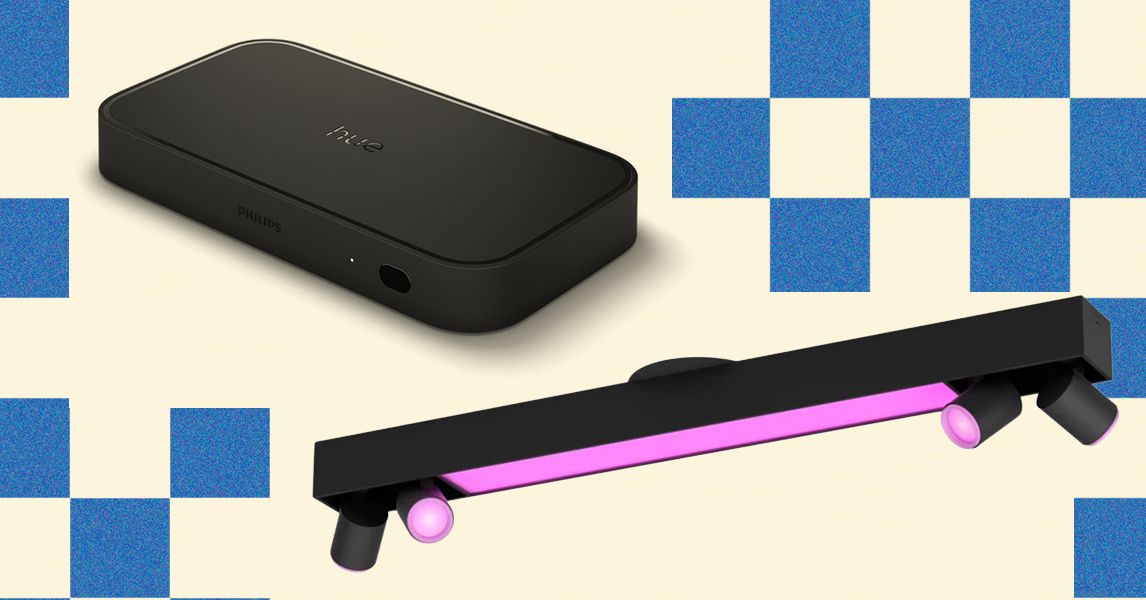
Some smart lighting manufacturers offer hubs that enable faster local control. Hubs are also sometimes required for certain features. If you are opting for Philips Hue, a Bridge ($50) or Bridge Pro ($99) is essential to get the most from your lights. They work best when plugged directly into your router via Ethernet cable.
How to Use Smart Lighting in Your Living Room
Your main living room or lounge is a great place to start, because it can almost certainly benefit from mood-setting light. The trick with smart lighting is to hide the actual device, so all you see is the light it’s putting out. Light strips can be attached to the back of your TV, the back or underside of furniture, or in recessed spots around features like built-in cabinets. Light bars or wall washers can sit relatively unobtrusively facing walls or features like fireplaces to bathe them in light.
You can round off with some well-placed smart lamps, though you can also retrofit by using smart bulbs or smart plugs to sync regular lamps. Remember to put smart bulbs in your regular fixtures, too, and gain complete control of the lighting in your space.
Recommended Living Room Smart Lights


Philips Hue
Play Wall Washers
These versatile lights can paint your walls with light at whatever color or temperature you desire. I use one in the fireplace (an orangey-red light makes you feel warmer), and one on top of the cabinet.


Philips Hue
Play Gradient Light Tube
This tube is designed to go behind the TV, but it doesn’t fit my new setup, so I have placed it behind one of my couches instead. It rotates and effectively illuminates the wall behind the couch.
Behind the TV is the perfect place for subtle background light that won’t cause any reflections on the screen. It also helps your TV picture pop. There are different models for different TV sizes, and they come with adhesive brackets to hold them in place.


Philips Hue
Play HDMI Sync Box 8K
If you want to add a layer of immersion to your movies and gaming, the Hue Sync Box is a great way to do it. You can group lights in an area and have them match the onscreen colors. It is very expensive, and it doesn’t work with smart TV apps, but it’s a fun way to get more from your Philips Hue setup. You can sometimes save some money by opting for a bundle deal.

Philips Hue
Smart Dimmer Switch
This switch can be configured to control all the lights in the room and makes it easy for anyone to turn them on and off and tweak the brightness.
Alternative Living Room Smart Lights
There are cheaper alternatives. Govee offers a range of great lights, like the Strip Light 2 Pro ($60), RGBIC Light Bars ($40), and the HDMI 2.1 Sync Box 2 ($180). Signify is the parent company of Philips Hue and offers the far more affordable Wiz range. You can get bulbs, light strips, and even an HDMI Sync Box with Backlight ($65).
How to Use Smart Lighting in Your Office
Your workspace should be well-lit. For a long time, I had a floor lamp in the corner, light panels on the wall, and a lightstrip behind my main monitor, all triggered to go on or off by a security camera. I also scheduled different kinds of light based on the day and time, so I’d go for energizing bright, cool light in the morning and slightly warmer light in the afternoon. Recently, I’ve been using a light bar that sits on top of my monitor to illuminate my desk.
If your office converts into an entertainment space at night, you’ll want versatile lighting to change things up and give the space a different feel when the workday is done. I set up a voice command when it was “gaming time” after work or for weekends that would trigger more relaxed, fun colored lighting.
Recommended Office Smart Lights
My colleague raved about these light bars that sit on top of your monitor. I am similarly enamored after trying this model, which has motion sensing to turn on and off automatically and a wireless dial control to fine-tune brightness and color temperature.

Philips Hue
Play Gradient Lightstrip for PC
The Philips Hue Play Gradient Lightstrip for PC pairs with software to reflect the onscreen action for movies or games, but it’s also just a nice source of background light that won’t cause any reflections.

Light panels can add interest to your room, and these blocks from Nanoleaf can also be used to hold headphones or controllers or display ornaments like Funko Pops.

Philips Hue
Signe Floor Lamp
This light tube is perfect for corners and reflects whatever color and temperature of light you want onto both walls. There is also a cheaper and shorter table lamp version.
Alternative Office Smart Lights
There are many alternatives. The Govee Floor Lamp 2 ($130) is quite a bit cheaper. Nanoleaf offers all sorts of different shapes of panels, or you could opt for wall-mounted bars, like the Govee Glide ($70).
How to Use Smart Lighting in Bedrooms
The two main smart lights I recommend in bedrooms are lightstrips under the bed and smart lamps. Underbed lighting is perfect when you don’t want to be dazzled or wake your partner, providing just enough light to see your way around the room without stubbing your toe. It’s also nice for relaxing. Smart lamps can be scheduled to help you wake in the morning, and they can be used for reading at night or gradually winding down.
I’ve talked about how to use smart lights in your kid’s bedroom before, because they can be great for dispelling fears of the dark. You can schedule them to dim over time or even switch off when your child has dropped off. If you snag a portable smart light, that can also be super handy if you have to get up in the night to tend to your wee one, or for older kids who wake needing the toilet.
Recommended Bedroom Smart Lights

Govee
RGBIC Pro LED Light Strips
We have used various lightstrips as under-bed lighting. We started with the cheapest single-color strips from Govee but later switched to these multicolor strips.
%2520SOURCE%2520Simon%2520Hill.jpg)
Philips Hue
Go Portable Table Lamp
This lamp can be picked up and carried with you when you get up at night and recharges when you return it to the wireless charging base. You can also set multiple scenes to switch through with the button on top.

The clever Wiz lantern-style portable lamp supports lots of fun effects. My family used it a lot when the kids were young.
Alternative Bedroom Smart Lights
You might also consider a Wiz Smart LED Strip ($18), or pretty much any cheap light strip for underbed lighting, though I’d always try to pick one with a physical power button. I also love the Philips Hue Twilight Lamp ($308) because it has two lighting zones and configurable buttons to control all the Hue lights in the room, and it goes from very bright to very dim according to your needs, but it is ridiculously expensive. Another nice option for kids’ bedrooms is a star projector. After testing a few, the Sega Toys Homestar Flux ($259) is my favorite.
How to Use Smart Lighting in the Kitchen and Dining Room
While these spaces are often open-plan, you want a very different lighting vibe in your kitchen than you do in your dining space. Kitchens need a lot of bright light focused on the countertop. When we renovated the kitchen in our old house, we installed a Philips Hue fixture with a light bar and four adjustable spots, and it proved a great way to add task lighting to our existing setup. I also love that you can adjust the type of light to be warmer and dimmer at night.
For your dining room, you will prefer softer and warmer light, though it’s still good to have a potentially bright fixture focused on the table. Pendant lights with smart bulbs in them work best. We also use a light strip on top of a wall cabinet to add motion-activated background light to the space. Smart lamps of all kinds also work great in a dining room.
Recommended Kitchen and Dining Room Smart Lights
You can also get fixtures from Philips Hue, and the Centris 4 turns a single fixture into a lightbar with four adjustable spots, though you’ll need an electrician to fit it.


Philips Hue
OmniGlow Strip Light
We have this strip on top of a dining room cabinet, triggered by a security camera at night when we come in the side door. It’s also nice for creating a warm atmosphere when we’re eating at the table or cranking up the brightness for board game night.
Alternative Dining Room and Kitchen Smart Lights
There are tons of other options, including more affordable Govee light strips, like the extendable Strip Light 2 Pro ($60), which you can fit on top of or behind furniture or built-in cabinets. Next, I’m hoping to test some retrofit, rechargeable under-cabinet lights for lighting up the countertops in my kitchen.
How to Use Smart Lighting in Your Backyard and Outside
You have plenty of options for outdoor lighting, and I highly recommend installing lights in shady spots that you frequently have to navigate in the dark, whether that’s the side path leading to your trash cans, your driveway, or your front porch. They increase security and help you avoid tripping in the dark. If you also want to install outdoor security cameras, many have built-in spotlights, and you can get floodlight options. You can also use cameras to trigger smart lights when they sense motion; otherwise, you’ll want to install a weatherproof motion sensor.
You could also consider solar lights that automatically turn on after dark, or simply schedule your smart lights. An increasingly popular option is permanent outdoor lights that you fix to the eaves of your home, though this won’t be suitable or permissible for all properties. For an in-depth dive on this, read Should You Get Permanent Outdoor Lights?
Recommended Backyard and Outdoor Smart Lights
These solar spotlights make life easy with scheduling support and provide reliable pops of color and tunable white light when the sun goes down.

Govee
Permanent Outdoor Lights Pro
I had this customizable string of weatherproof lights on the eaves of my old home, and they’re great for holidays like Halloween with colors and animations, but can also deliver a classy white light.

My favorite floodlight camera is a dual-lens, pan-tilt camera with automatic tracking and two adjustable floodlights that can put out up to 2,000 lumens.
Alternative Outdoor Lights
There are many, many other options for outdoor lighting, including string bulbs, like Lighting Legends Outdoor Elite Festoon (£50) for warm white, or string lights, like the Twinkly Strings Multicolor ($70). Just make sure you have an outdoor extension box that’s big enough to accommodate the power adapters.
How to Use Smart Lighting Everywhere Else
Take a look around your home and consider what areas would benefit from smarter lighting. Do you have a pantry or cupboard that’s always dingy? Maybe you want dim automatic lights in the bathroom at night? Perhaps you want to light up a feature or frame a favorite picture? In my old house, we used a Govee light strip on the stairs as they were poorly lit. It was triggered by an Eve Motion sensor and proved a great way to add a low-level light to a tricky area.

Govee
Neon Rope Light Strip 2
This flexible diffused light strip comes with adhesive-backed metal brackets, and it’s a versatile smart light with a host of animations in the Govee app.
Power up with unlimited access to WIRED. Get best-in-class reporting and exclusive subscriber content that’s too important to ignore. Subscribe Today.




Leave a Reply